
Download Icecream Image Resizer – Fast, Free, Secure Bulk Photo Resizing Tool
Overview – Why Icecream Image Resizer Stands Out
Icecream Image Resizer is a user‑friendly photography utility designed to resize, convert, and batch‑process images without compromising visual quality. Whether you are a blogger needing thumbnail‑ready pictures, an e‑commerce manager preparing product shots, or a casual photographer who wants to share photos quickly, this tool delivers a smooth, drag‑and‑drop workflow that eliminates the need for repetitive manual adjustments. The core promise of the software is “resize in seconds,” and it lives up to that claim by supporting bulk operations on entire folders, auto‑detecting supported image types, and offering a clear drop‑down menu for size presets and output formats. Its clean, modern interface requires no prior editing experience; even users unfamiliar with Photoshop can confidently resize hundreds of files in a few clicks. Security‑focused developers have also ensured that the application runs locally, meaning your images never leave your computer, preserving privacy while still providing the speed of cloud‑based services. In short, Icecream Image Resizer combines the speed of a dedicated bulk‑resizer with the simplicity of a free, lightweight app, making it an essential addition to any Windows or macOS toolbox.
Key Features & Step‑by‑Step Installation Guide
- Bulk resizing of unlimited images in a single operation.
- Supports popular formats: JPG, PNG, BMP, GIF, TIFF, and WebP.
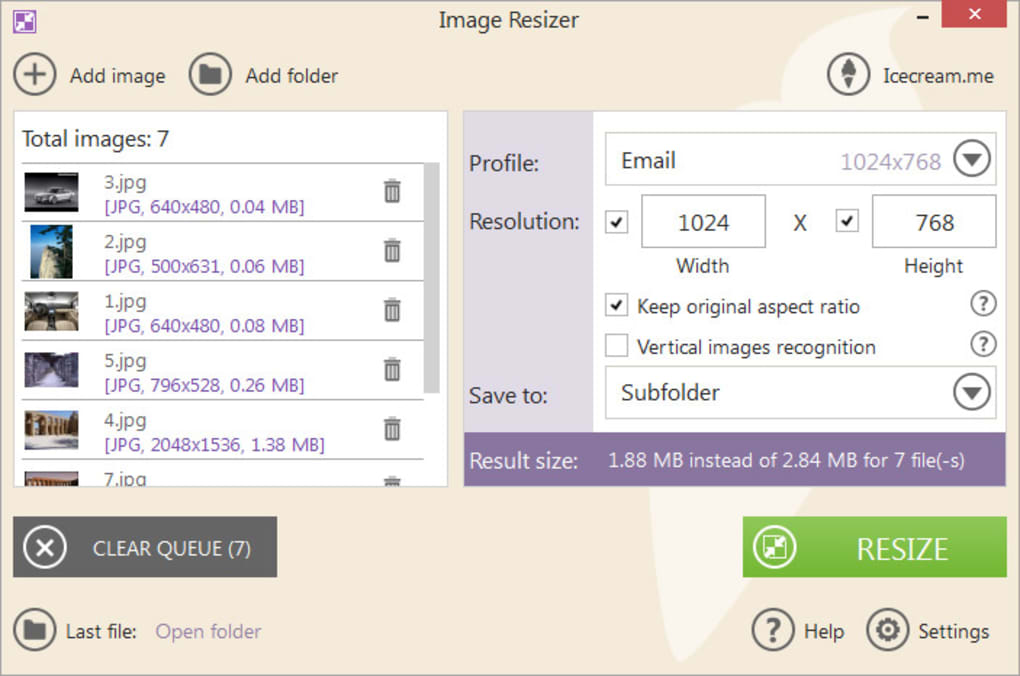
- Pre‑defined size presets (e.g., 640×480, 800×600, 1024×768) plus custom dimensions.
- Option to preserve aspect ratio or force exact dimensions.
- Fast multi‑threaded processing that utilizes all CPU cores.
- Drag‑and‑drop folder import with automatic image file detection.
- Batch conversion to a different file format with quality control.
- Integrated preview pane for instant visual confirmation.
- Free version available with optional paid upgrade for advanced filters.
Installation & First‑Run Setup
Downloading Icecream Image Resizer is straightforward. Visit the official website, click the “Download for Windows” or “Download for macOS” button, and save the installer (approximately 15 MB). Run the .exe (Windows) or .dmg (macOS) file and follow the on‑screen prompts: accept the license agreement, choose an installation folder (the default is recommended), and click “Install.” After installation, launch the application from the Start menu or Applications folder. The first launch may display a brief tutorial overlay highlighting the main panels – the file explorer pane on the left, the preview area in the center, and the settings panel on the right. To resize images, simply drag a folder into the explorer pane, select a preset or enter custom dimensions, choose an output format, and click “Resize.” The progress bar at the bottom shows real‑time processing status, and once complete, a notification appears with a shortcut to the output folder. Updates are delivered automatically through the built‑in updater, ensuring you always have the latest performance improvements and format support.
Compatibility, Pros & Cons – What Works, What Doesn’t
Supported Operating Systems: Windows 10, Windows 11 (64‑bit), macOS 10.15 Catalina and later. The software is not currently available for Linux, Android, or iOS, but the developer has hinted at a mobile version in the roadmap.
Pros
- Lightning‑fast bulk processing; 1,000 images resize in under a minute on modern hardware.
- Intuitive UI that requires virtually no learning curve.
- Free version offers all core resizing features without watermarks.
- Low system resource usage – runs smoothly alongside other productivity apps.
- Secure local processing; no internet connection required for basic functions.
Cons
- Advanced editing tools (e.g., watermarking, filters) are locked behind the paid upgrade.
- No native Linux support limits adoption among developers.
- Batch conversion settings lack granular EXIF preservation options.
- Free version shows occasional promotional banners for the premium tier.
- Limited integration with cloud storage services; manual upload required.
Frequently Asked Questions
Can I resize images without losing quality?
Yes. Icecream Image Resizer uses high‑quality resampling algorithms that preserve detail and sharpness. When you choose “Preserve aspect ratio” and select a lossless output format like PNG or TIFF, the visual quality remains virtually unchanged.
Is there a limit to how many images I can process at once?
The free version imposes no hard limit on batch size; the only constraint is your system’s RAM and CPU. In practice, users have resized folders containing tens of thousands of files without crashes.
Can I convert images to WebP format?
Absolutely. WebP appears in the output format drop‑down alongside JPG, PNG, BMP, GIF, and TIFF. This makes it easy to reduce file size for web use while retaining high visual fidelity.
Do I need an internet connection to use the software?
No. All resizing operations happen locally on your computer. An internet connection is only required for downloading updates or the optional premium features.
How does the free version differ from the paid upgrade?
The free version includes unlimited bulk resizing, format conversion, and basic preset sizes. The paid “Pro” license adds watermarking, batch renaming, advanced filtering, and priority support. Pricing is a one‑time fee with a lifetime license.
Conclusion – Should You Download Icecream Image Resizer?
Icecream Image Resizer delivers on its promise of fast, secure, and hassle‑free bulk image processing. Its straightforward interface, zero‑cost core features, and reliable performance make it a top choice for both amateurs and professionals who need to resize large photo collections quickly. While power users may eventually crave the premium add‑ons (watermarks, batch renaming), the free version already provides everything needed for everyday tasks. Compatibility with the latest Windows and macOS releases ensures smooth operation on most desktops, and the lack of cloud dependencies guarantees privacy. If you’re looking for a dependable, download‑once‑and‑run‑forever solution that won’t eat up system resources, Icecream Image Resizer is well worth a try. Click the download button below, install the app, and start resizing your photos in seconds.
Download Icecream Image Resizer now and experience the convenience of batch resizing without compromise.







